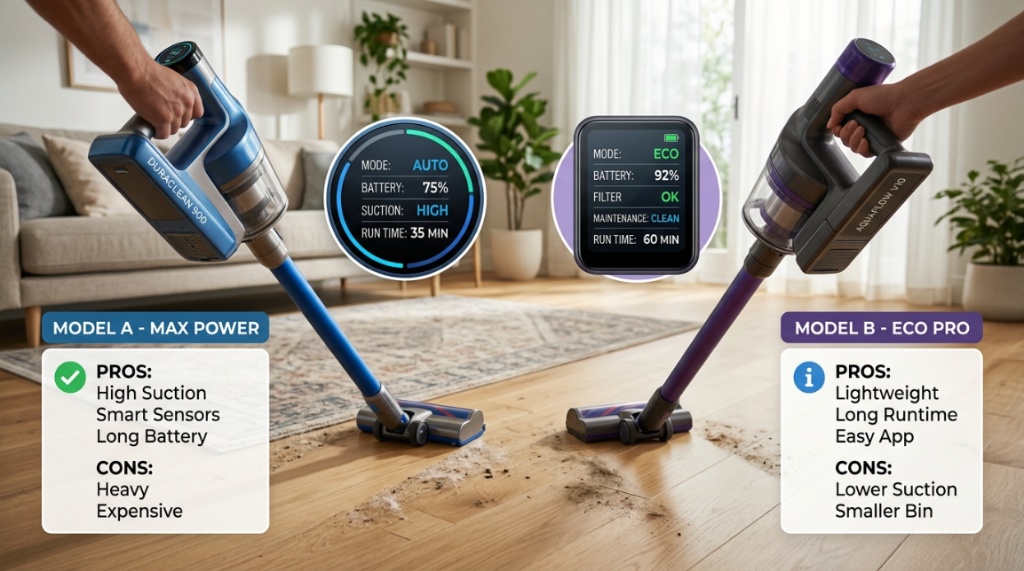
You’ve seen them online: sleek cordless vacuums with bright LED screens that track battery life, show cleaning modes, and even alert you to maintenance issues. They look futuristic, but they also cost significantly more than standard cordless models. So, is a touchscreen cordless vacuum a genuine game-changer for home cleaning, or is it just an expensive gimmick? The honest answer is that it depends entirely on how you clean, your budget, and your tolerance for technology in household appliances. This article breaks down the real-world value of touchscreen controls, the critical performance factors that matter more than the display, and practical advice to help you decide if this premium feature is worth your money.
Key Takeaways
- A touchscreen display does not improve suction power or cleaning ability; it enhances usability, feedback, and mode control.
- Battery life and motor wattage are far more critical than screen technology for real-world cleaning effectiveness.
- Touchscreens add useful features like live battery percentage, blockage alerts, and power mode customization.
- If you own a multi-floor home or frequently switch between hard floors and carpets, quick screen-based mode switching saves time.
- Basic button controls are often enough for budget-conscious buyers, but a screen is valuable for users who want precise control and diagnostics.
What Exactly Is a Touchscreen Cordless Vacuum?
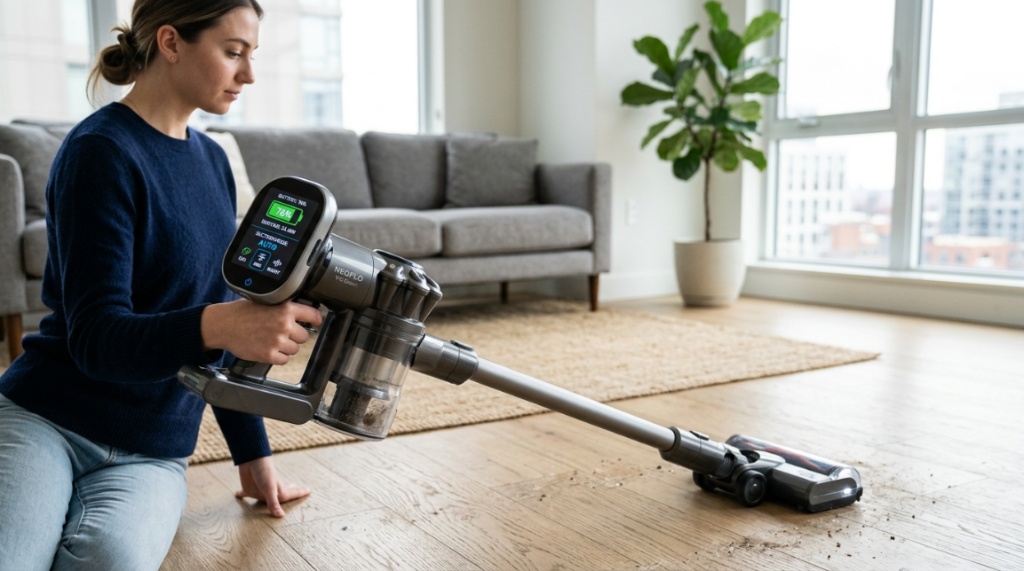
A touchscreen cordless vacuum is a stick or handheld vacuum that replaces physical buttons or simple LED indicators with an interactive display. This screen is typically located on the top or rear of the handle, where your thumb naturally rests. The interface allows you to switch between Eco, Standard, and Boost modes; view remaining runtime in minutes; and often access maintenance alerts such as filter cleaning reminders or brush roll jams. High-end models may even offer digital motor speed control, allowing you to dial in exact suction levels rather than relying on preset modes.
This is not simply a branding exercise. The screen serves as a central hub for diagnostics, significantly reducing the guesswork involved in troubleshooting airflow issues. Instead of dismantling the vacuum to check for clogs, the screen tells you precisely where the blockage is located. For tech-oriented users, this is a massive convenience factor. If you are researching specific models, you might find it helpful to explore a detailed review of a touchscreen cordless vacuum to see how these features function on a specific device.
Why the Screen Matters Less Than the Motor and Battery
It is incredibly easy to be swayed by the visual appeal of a glowing digital interface. However, you must understand a fundamental truth: the touchscreen is an interface, not a performance component. The primary drivers of cleaning success are the motor’s wattage and the battery’s capacity. A vacuum with a brilliant screen but a weak 300-watt motor will still underperform a button-controlled model with a 650-watt motor. The screen does not remove pet hair from carpet fibers or push dirt out of tight crevices; it only tells you when you are using the right setting to do so.
Do You Actually Need Real-Time Battery Metrics?
Most standard cordless vacuums use a series of small LED lights to indicate battery level—usually showing three or four bars that deplete as you run the machine. A screen changes this experience by providing an actual countdown timer and percentage readout. Is this useful? Yes, particularly if you find yourself frustrated by the ambiguity of “medium battery” on traditional models. Knowing you have exactly nine minutes of Boost mode left allows you to prioritize high-traffic areas over less-visible corners before the unit dies. This eliminates the annoyance of the battery cutting out just as you are finishing the living room.
Understanding the Cost of the Screen
Adding a full-color display increases manufacturing costs. This premium is passed directly to the consumer. Budget models with simple controls might retail for significantly less than their touchscreen-equipped counterparts. You must weigh whether that price difference is justified by the convenience of a live readout. If the screen fails or cracks, repair costs can also be higher because the firmware and display hardware are tightly integrated. This is rarely a problem with basic button mechanicals, which have far less that can go wrong electronically, To upgrade your home cleaning setup further, read our guide on how to Choose the Right Hoover Vacuum Cleaner for Your Home This Year.
The Real Benefits: Diagnostics and Customization
While the screen does not improve motor output, it offers tangible benefits that extend beyond convenience. The most valuable feature for long-term maintenance is automatic fault detection. When a brush roll jams or the HEPA filter becomes saturated, standard vacuums simply struggle or shut off, leaving you to investigate mechanically. A touchscreen model identifies the issue, displays a code or image on the screen, and provides instructions for the fix. This proactive diagnostic ability protects the motor from running under strain for extended periods, potentially extending the vacuum’s lifespan.
Filter and Maintenance Reminders
Another overlooked benefit is filter monitoring. Most users forget to wash filters, gradually losing suction over several weeks without realizing why. Touchscreen models often track the hours the motor has run and display a maintenance reminder when a filter cleaning is due. This ensures the machine performs at peak efficiency throughout its life. You are not just paying for a pretty display; you are paying for a system that tells you when to look after the vacuum, preventing premature motor failure.
Comparing Touchscreen vs. Button Controls
To make an informed purchase, you need a side-by-side understanding of what you gain and lose with each interface system. The table below outlines the critical differences.
| Feature | Traditional Button / LED Control | Touchscreen Display |
|---|---|---|
| Battery Status | Low/Medium/High (estimated) | Exact runtime in minutes and percentage |
| Mode Switching | Cycle through preset modes sequentially | Tap directly to select Eco, Standard, or Max |
| Fault Detection | Motor shuts off, physical inspection needed | Visual indicator shows blockage or jam location |
| Maintenance Cues | None (manual tracking required) | Automatic prompts for filter washing |
| Custom Suction Levels | Not available usually | Slider to adjust power granularly |
| Repair Complexity | Simple and cheap to replace buttons | Complex circuit board and display replacement |
Scenarios Where a Touchscreen Is a Necessity
A touchscreen is not for everyone, but specific user profiles benefit immensely. If you match these scenarios, the extra investment is likely justified.
For Multi-Surface Homeowners
If your living space transitions from large areas of hardwood or tile to thick, plush carpet, you are constantly changing suction levels. With button controls, you may cycle through Eco to Medium and miss Max, or have to press the button repeatedly to find the desired setting. A touchscreen allows you to move from “Hard Floor” mode to “Carpet” mode with one tap, reducing wrist strain and allowing you to clean more consistently without pausing to check which mode you are in.
For Allergy Sufferers Monitoring Airflow
Allergy sufferers rely heavily on HEPA filtration and proper airflow to capture dust mites and pollen. If the filter becomes blocked, air bypasses the filter, reducing allergen capture. The diagnostic alerts on a touchscreen vacuum are invaluable here. Instead of realizing a filter is clogged because you smell dust or notice the motor overheating, the screen alerts you immediately upon suction drop, allowing you to maintain healthy air quality levels throughout the cleaning session.
Who Should Skip the Touchscreen Upgrade?
Despite the benefits, there are instances where the touchscreen is simply an unnecessary luxury. Being honest about your habits helps avoid overspending.
If You Prefer Simple Plug-and-Play Devices
If you prefer devices that require minimal interaction—just pick up and run—the touchscreen provides no distinct advantage. You will likely set the vacuum to “Auto” mode and never touch the screen again. In this case, you are paying a premium for a high-definition display that remains static while you clean. The battery readout might be nice, but not worth a significant price jump if four LED lights have served you fine for the past ten years.
If You Need Maximum Battery Runtime on a Budget
Manufacturers often allocate budget within a vacuum’s BOM (Bill of Materials). Money spent on a large touchscreen is often money diverted from the battery pack or motor inverter. For the same price, you can often buy a vacuum without a screen but with a significantly larger 3000mAh battery or a more powerful motor. If your priority is cleaning a massive home without stopping to recharge, prioritize battery capacity over display features.
What to Check Before Buying: Essential Specifications
Whether you decide on a screen or not, you absolutely must verify certain specifications before purchase to avoid disappointment. The screen technology should not overshadow these core components.
- Airflow/Watts: Look for vacuums in the 500W-650W range for strong deep-cleaning performance on carpets. Lower wattage (under 300W) often requires multiple passes.
- Battery Capacity: Check the mAh rating. 2000mAh is approximately 20 minutes in standard mode, while 2500mAh or more provides 40-60 minutes.
- Cyclone Technology: Ensure it has a multi-cyclonic system that separates dust from air to prevent filter clogging and maintain constant suction.
- Brush Roll Design: Look for anti-tangle features for pet hair. A combined rubber and bristle brush works best on mixed flooring.
- Weight Distribution: The motor and battery should sit lower in the handle, making the device easier to maneuver and reducing wrist fatigue.
Frequently Asked Questions
Do touchscreen vacuums consume more battery power?
Yes, the display does draw power, but the consumption is minimal compared to the motor. You can expect the screen to marginally reduce runtime, typically by less than 2-3 minutes across a full charge. Li-Ion cells mainly drain through motor load, not the LCD backlight.
Can a touchscreen vacuum handle pet hair effectively?
Yes. The touchscreen does not affect pet hair pickup. The most critical factor is the design of the motorized brush roll—specifically, whether it has anti-tangle vanes. However, the screen helps by allowing you to immediately switch to “Max” mode when tackling stubborn fur on upholstery.
Are touchscreen displays easy to read while cleaning?
Most screens are positioned to face upward at the rear of the handle, which stays in your peripheral vision. If a screen is in front of you vertically, you often have to stop and bend your head down. Look for a rear-facing screen that aligns with your sightline when the handle is tilted, not one positioned high at eye level.
Is charging time longer for models with a touchscreen?
No, charging time is determined by the battery capacity and the charger output (e.g., 1.0A vs. 2.0A), not the display hardware. A newer touchscreen vacuum with a 2500mAh battery will take the same time to charge as a button model with the same battery if both use identical charger specs.
What happens when the screen cracks on a cordless vacuum?
The vacuum will likely stop functioning until the screen is replaced because the control logic is often integrated into the display module. Unlike buttons that have physical logic circuits separate from the interface, the screen is the control hub. Warranty coverage is essential for this component; repair costs can be significant.
Conclusion
So, is a touchscreen cordless vacuum worth buying? Ultimately, yes for those who value precise control, live diagnostics, and proactive maintenance alerts, but a definitive no for anyone focused purely on budget or raw suction per dollar. The screen elevates the user experience by removing guesswork from cleaning modes and routine maintenance. However, if you are seeking raw cleaning power, ignore the screen and look at the wattage and battery capacity first. Choose a machine that cleans well and feels comfortable in your hand, and treat the touchscreen as a convenience you can appreciate, not the main reason to buy.